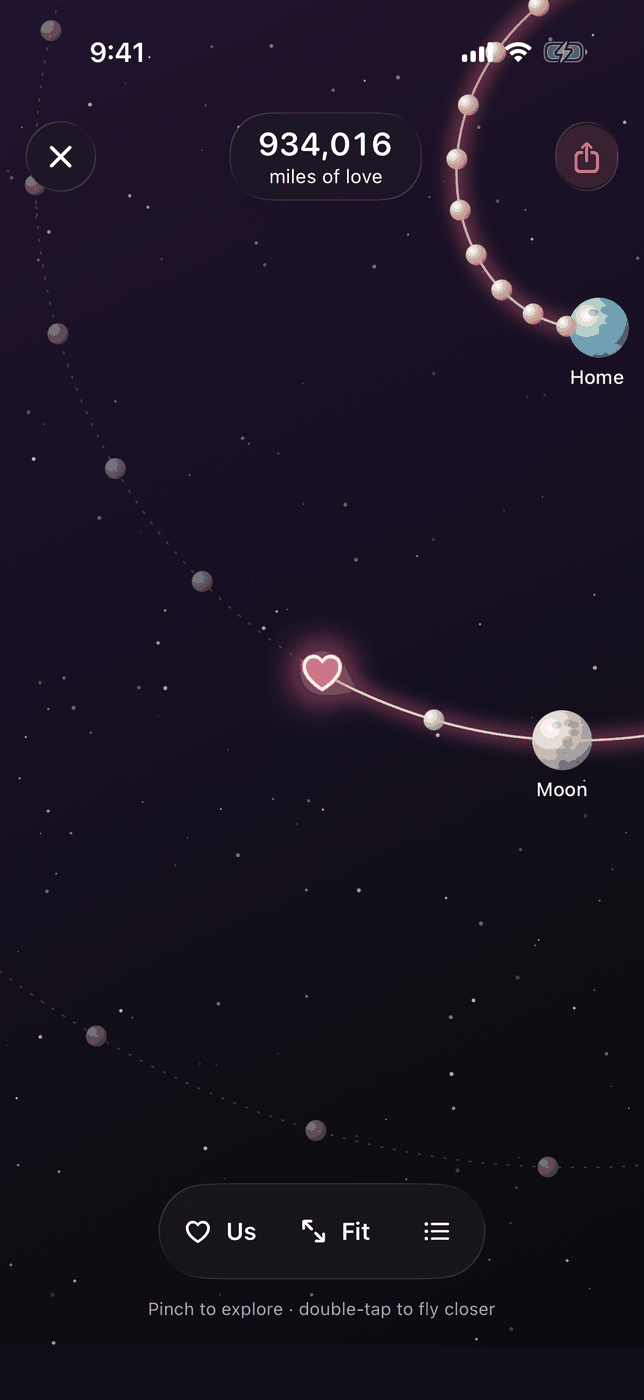
What miles of love are
Miles of love is a feature of Love Taps, added in version 1.2.0. You and your partner each choose a city. Love Taps works out the straight-line distance between those two cities, and every tap either of you sends adds that distance to a running total. If you live 3,461 miles apart, one tap adds 3,461 miles, and ten taps add 34,610 miles.
The total is all time and it only goes up. Nothing in the feature takes miles away.
One number for the two of you
Miles of love is one shared number for the pair, never a score per person. Taps from both phones go into the same total, and both of you see the same figure. The number appears on the home screen of the app, next to your shared tap count. Tap it to open the galaxy.
The galaxy
The galaxy draws your total as a journey. A spiral route starts at Home and winds outward past milestone stars. Your heart sits on the route at the point your miles have reached, so you can see which milestones are behind you and which are ahead.
- Pinch to zoom in and out, and drag to move around the galaxy.
- Us moves the view to your heart on the route.
- Fit zooms out to show the whole galaxy.
- Milestones opens a sheet that lists every milestone from Home onward. Choose one to fly the view to its star.
Milestones along the way
The milestones are fixed distances, listed in the app in order from the shortest to the longest. There are 53 of them after Home. Here is a selection, with the distance each one marks.
| Milestone | Miles |
|---|---|
| A swim across the English Channel | 21 |
| A marathon | 26.2 |
| A century ride | 100 |
| Up to the Space Station | 254 |
| Boston to Washington | 394 |
| The Appalachian Trail | 2,190 |
| Route 66 | 2,448 |
| London to New York | 3,461 |
| The Nile | 4,404 |
| London to Sydney | 10,560 |
| Once around the Earth | 24,901 |
| To the Moon | 238,855 |
| To the Moon and back | 477,710 |
| A million miles | 1,000,000 |
| Venus | 24,000,000 |
| Mars | 33,900,000 |
| The Sun | 92,955,807 |
| Jupiter | 365,000,000 |
| Saturn | 746,000,000 |
| Neptune | 2,700,000,000 |
| Pluto | 3,671,754,387 |
| Proxima Centauri, the next star | 24,963,582,647,224 |
Planet distances are measured at their closest approach to Earth. The last milestone is Proxima Centauri, the nearest star to the Sun.
Cities only, never your location
Love Taps never asks for location permission. You find each city by typing its name into a search box, and either partner can fill in both cities. Love Taps keeps each city’s coordinates rounded to a tenth of a degree, which is all it needs to measure the distance between them. Miles of love does not know where either of you is at any moment, only the two cities you chose.
What the distance looks like for real city pairs
The distance reference pages show the straight-line distance between popular city pairs and what it adds up to in taps. A few examples:
- New York to London: 3,461 miles. 70 taps pass the average distance to the Moon.
- Boston to London: 3,271 miles. 74 taps pass the average distance to the Moon.
- London to Sydney: 10,560 miles. 3 taps go once around the Earth.
- Honolulu to Manila: 5,299 miles. 5 taps go once around the Earth.
- Chicago to Los Angeles: 1,742 miles. 15 taps go once around the Earth.
- Dubai to Delhi: 1,370 miles. 19 taps go once around the Earth.
The app measures between the exact cities you pick, so its figure can differ slightly from these pages. For call planning, the time difference pages show the best hours to reach each other.
How to start counting miles
- Install Love Taps on both iPhones and pair. The invite guide shows how.
- Open the miles card on the home screen of the app and add your two cities.
- Send a tap. Each tap from either of you adds the distance to your total.
Miles of love sits alongside the rest of Love Taps: taps, five moods, the couple widget and a shared reunion countdown. Read more on the long-distance relationship app page.
Questions about miles of love
How are miles of love counted?
Each tap adds the straight-line distance between your two cities. The total is all time, it only goes up, and it is one number for the two of you.
Does Love Taps use my location for miles of love?
No. Love Taps never asks for location permission. You type in your cities, and either partner can fill in both.
Is the number per person?
No. Taps from both partners add to one shared number. There is no per-person split.
What can I do in the galaxy?
Pinch to zoom, drag to move, use Us to find your heart, use Fit to see the whole galaxy, and open the Milestones sheet to jump to any milestone.
Which milestones are there?
There are 53 milestones after Home, from a swim across the English Channel at 21 miles to Proxima Centauri at about 25 trillion miles, with stops such as once around the Earth, the Moon and the planets.
Which version of Love Taps has the galaxy?
The galaxy is in Love Taps version 1.2.0 and later, on iPhone with iOS 17 or later.
Find Love Taps on the App Store
One paid plan connects both partners. Example US prices: $1.99 monthly, $9.99 annual or $19.99 lifetime. The App Store shows local prices.
By Love Taps · Updated November 4, 2026